top of page
Gerhard Lowe
Australia, the Home of InClass school timetabling
New TimeTable Setup
Anchor 2
In step 3 we are setting the parameters of the selected timetable. Because you can work on different timetables with different parameters, every timetable has its own parameters over the same set of data. So select the timetable and then select Initial Setup from the timetabler tools form. If you have copied a timetable to a different name you also may chose a different setup.
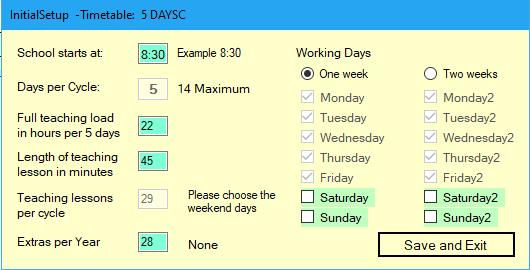
Here you set up some basic parameters of the timetable and teacher loads.
Indication of extras per year is by Union demand determined, if not needed click None or set it to zero.
Here you enter all lessons and recess and lunchtimes. You need to mark teaching lessons and not teaching lessons by using the tick boxes.

bottom of page